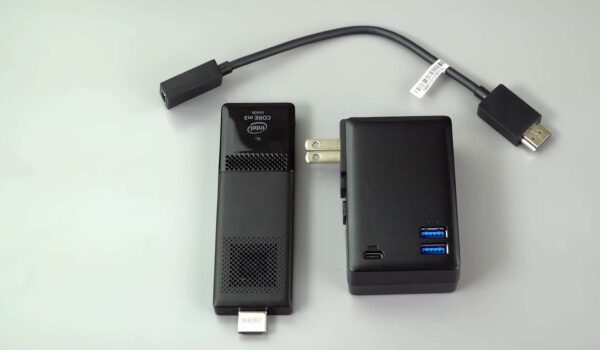
In a world where technology continually evolves and demands for portable, efficient computing solutions are on the rise, the Intel Compute Stick emerges as a versatile and compact powerhouse. This revolutionary device has redefined the way we think about personal computing, offering a pocket-sized solution that packs a substantial punch. In this comprehensive review and specification guide, we delve into the Intel Compute Stick’s capabilities, features, and performance, shedding light on its potential to transform the way we work and play. Whether you’re a professional on the go, a digital nomad, or simply seeking an unobtrusive computing solution for your home, join us as we explore the Intel Compute Stick and discover how it brings computing convenience to a whole new level.
Intel’s Innovative Compute Stick: Transform Your TV into a Smart Hub
In the grand unveiling at the 2015 Consumer Electronics Show, Intel brought forth a game-changer in the world of portable computing: the Compute Stick. Imagine a compact USB stick, no larger than a pack of chewing gum, that packs the punch of a full-fledged Windows 8.1 PC. But this isn’t just your run-of-the-mill dongle; it’s a powerhouse with integrated Wi-Fi, Bluetooth capabilities, and even a micro SD expansion slot. The Compute Stick has truly redefined the concept of on-the-go computing.
Key Features of the Intel Compute Stick:
- Full Windows 8.1 PC: The Compute Stick isn’t a watered-down version of a PC; it’s the real deal. You’ll have access to the full Windows 8.1 experience, complete with all your favorite applications and software;
- Portable and Convenient: This device is designed to fit in the palm of your hand, making it incredibly convenient for those who are always on the move. Whether you’re traveling for work or leisure, the Compute Stick can be your trusty companion;
- Transform Your TV: Similar to Chromecast, the Compute Stick can transform any standard TV into a Smart TV. This means you can enjoy streaming videos, playing games, and browsing the internet on your television, all without the need for a separate Smart TV;
- Seamless Wi-Fi Integration: With its built-in Wi-Fi capabilities, the Compute Stick effortlessly connects to your home network. This ensures a smooth and uninterrupted streaming experience, whether you’re watching your favorite shows or engaging in online gaming;
- Ample Storage Options: The Compute Stick is available in two versions to cater to your specific needs. You can opt for the Linux version with 1GB of RAM and 8GB of storage, priced at an affordable $89. Alternatively, the Windows 8.1 version offers even more power with 2GB of RAM and 32GB of storage, available at $149;
- Micro SD Expansion Slot: Worried about running out of storage space? The Compute Stick’s micro SD expansion slot allows you to easily expand your storage capacity, making it perfect for storing your media files, documents, and more;
- Release Date: Intel had enthusiasts eagerly waiting for the Compute Stick’s release, which was set for March. This means you wouldn’t have to wait long to get your hands on this remarkable piece of technology;
- Also, discover the battle of giants: Note 3 vs iPhone 6 Plus. Uncover their strengths, weaknesses, and which one reigns supreme!
Specifications of the Intel Compute Stick
| Category | Intel Compute Stick Specifications |
|---|---|
| Processor | Equipped with a potent quad-core Atom processor |
| Connectivity | Seamlessly connects via Wi-Fi and Bluetooth |
| Operating System | Runs on the Windows 8.1 platform |
| RAM | Employs a robust 2 GB of RAM |
| Storage | Provides ample storage with 32 GB memory, expandable up to a substantial 512 GB |
Conclusion
So, whether you’re a tech-savvy traveler looking for a versatile computing solution or someone eager to transform their TV into a Smart Hub, the Intel Compute Stick offers a world of possibilities in a compact, palm-sized package. Get ready to revolutionize your digital lifestyle!